FP&A · SERIES · Workforce Planning
Workforce Planning Starts Before You Click Create
The Workforce Planning choices you make before Create — modules vs custom, calendar, currency — are the ones you cannot undo later.

I’ve implemented Oracle Workforce Planning several times, and because it was also the focus of my most recent implementation, it feels like the right place to start. I’ve heard many implementers say it’s their least favorite module to deploy. I understand why: it relies on a lot of seeded content, so you need to configure and customize it carefully to avoid unintended challenges later in the build.
Especially during my earlier implementations, I sometimes took a couple of steps backward after taking a few forward. I felt like the itsy-bitsy spider climbing up the waterspout. The rain on those early projects came from changing client requirements, gaps in my understanding of the out-of-the-box content, and the normal learning curve that comes with any complex module.
We all have to start somewhere if we’re ever going to reach the top of that damned spout. My goal with this series is to help fellow EPM adventurers avoid at least some of the rain that can wash away your progress. Let’s be honest: like the spider, we can’t avoid every storm. We can limit our exposure by paying attention to the forecast.
I’ll do my best to be your slightly charismatic EPM weatherman — pointing at the clouds and pretending I totally saw them coming.
What this series covers
This is a multi-post series.
The first post focuses on the key decisions you need to make up front, before creating the application and enabling any features. I’ll also provide context on what you can enable out of the box — and, perhaps more importantly, what you should not enable. The biggest question may be whether you should implement the out-of-the-box module at all, or build a custom application that better fits your workforce planning needs.
Should you implement Workforce at all?
Whether you should use a modules-based Planning application that includes Workforce depends on your current planning process and the technology you use to build annual plans and periodic forecasts.
If you use a competing platform, start with a functional comparison against Oracle Cloud EPM. AI tools such as Claude, ChatGPT, and Perplexity can quickly produce a thorough comparison. Better yet, speak with your preferred systems integrator (SI) or Oracle directly. Oracle will be more than happy to demonstrate the EPM Cloud business processes that interest you. If you need a new partner for this effort, Donyati would be an excellent choice.
Many organizations still prepare annual budgets, plans, and forecasts in Excel, homegrown databases, or similar general-purpose tools. If that describes your organization, the case for moving to Oracle EPM Cloud becomes much clearer. The question then shifts to which technology stack offers your organization the best value.
Modules or custom?
Let’s assume you’ve done your homework and joined thousands of other organizations in investing in Oracle EPM Cloud. Now you face the next big decision: do you implement a modules-based application or choose a custom application?
Both options use the Planning business process, but the modules-based approach provides a tremendous amount of seeded, nearly ready-to-use content. It will usually get you up and running faster and at a lower implementation cost, helping you get your hands on some of that ROI sooner.
That will not always be true — especially if you need extensive customization and are unwilling to change your current planning process. At some point, heavy customization makes it better, cheaper, faster, and easier to build a custom application from the start rather than work around, or fight against, the prebuilt framework and seeded content. An EPM SI or Oracle can provide valuable guidance on the best approach for your organization’s needs.
What the application types actually mean
Okay, so you’ve decided that the out-of-the-box Workforce Planning module provides the functionality you need. You’re excited and ready to send those antiquated spreadsheets and databases to the recycle bin. Before you start, you need to decide which features to enable and understand several critical early choices that can determine whether your implementation succeeds or fails.
Failure is a real risk. Over the years, I’ve seen projects end with applications sitting on the shelf, never fully — or even partially — adopted. I’ve seen SIs removed and replacement partners brought in to rescue projects. Obviously, I’m the rescuer, not the one who got kicked out. I thought I should make that clear. I’ve also seen applications that were used but never delivered the value or improvement the organization expected.
When you create your application, you’ll need to enter a name and description and select an application type. Oracle offers several application types within the Planning business process. For this post, we’re focused on the modules-based application.
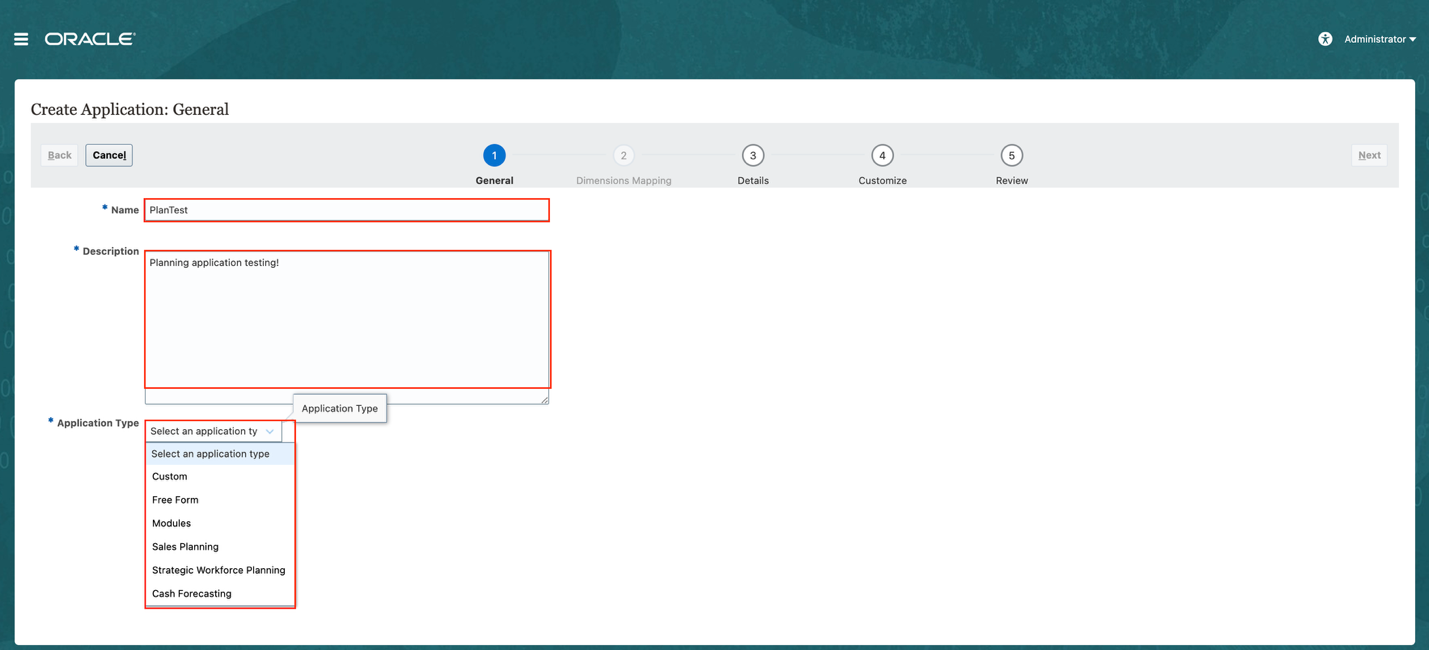
All application types share the same underlying platform and core functionality. What differentiates them is the amount and type of seeded content included for their intended purpose.
Custom is exactly what it sounds like: it assumes you’ll build a custom application. It includes no prebuilt, seeded content, but it does come with structural requirements. For example, the application must include the Entity, Account, Scenario, Version, Years, and Period dimensions.
| Dimension | Purpose | Example members |
|---|---|---|
| Account | Defines financial accounts, measures, and KPIs | Revenue, Salary Expense, Headcount |
| Entity | Represents the organizational structure | Total Company, Business Units, Departments |
| Scenario | Distinguishes types of data or planning cycles | Actual, Budget, Forecast |
| Version | Separates iterations or versions of a plan | Working, Final |
| Period | Defines time periods within a year | Jan, Feb, Q1, YearTotal |
| Years | Defines the years used for planning and reporting | FY26, FY27, FY28 |
Free Form is also exactly what its name suggests. It lets you design an application freely, without prescribed dimensional requirements. It is Oracle’s replacement for on-premises Essbase applications. Unlike a traditional Essbase application, however, Free Form includes a relational database component, so you get the benefits of a Planning application with the dimensional flexibility of an Essbase-only application.
The remaining application types include out-of-the-box seeded content and are purpose-built for specific use cases.
Calendar choices you make once
The first decisions are straightforward and should not require much debate. They concern your application’s periodicity, or calendar.
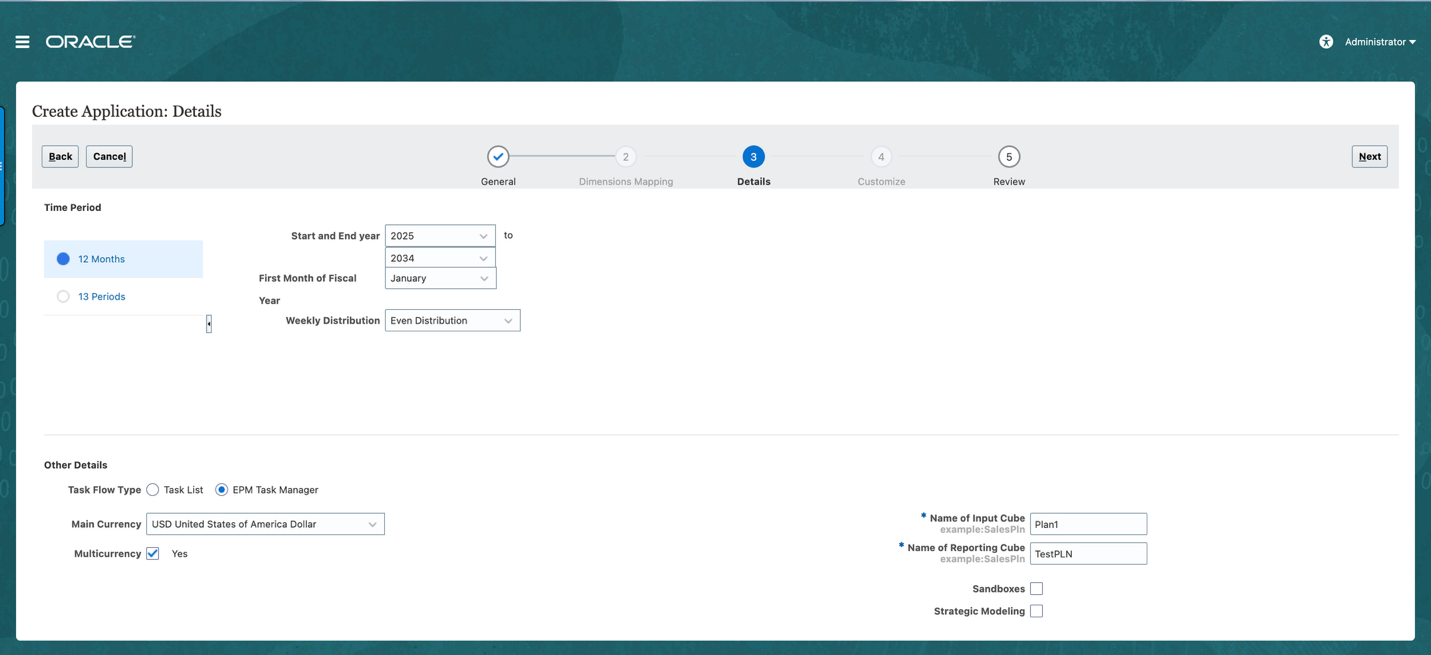
You’ll need to select a start year and an end year. Don’t worry — you can add years later, so there’s no need to begin with 20 years. 5 to 10 years is plenty.
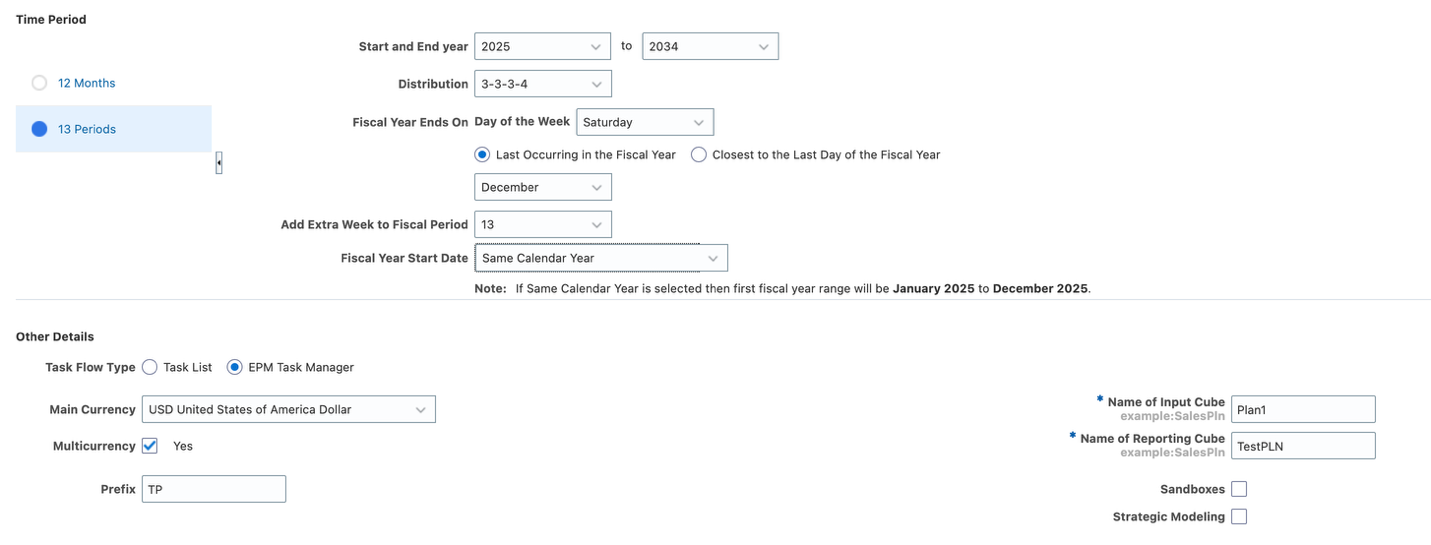
You’ll also need to choose between a 12-month and a 13-period configuration. If you’re wondering why anyone would use 13 periods, you may already have your answer: select 12 months and make your life easier. All joking aside, some organizations genuinely require a 13-period setup. These organizations typically need comparable periods, and 13 periods make that easy because each period contains exactly four weeks. You often see this approach in retail, restaurants, grocery, and hospitality businesses with highly seasonal, weekly sales cycles.
Your calendar choice will determine several other configuration options. I won’t cover them here because Oracle has done a bang-up job documenting those options and their impact. Start with About the Calendar and, if you need it, About 13-Period Calendars.
Task Manager, currency, sandboxes, and Strategic Modeling
The next decisions involve task flow type, multicurrency, sandboxes, and Strategic Modeling. The last two require less attention during the initial setup.
In a modules-based application, sandboxes are unavailable for the out-of-the-box seeded cubes. The feature is pretty slick, but you won’t get much use from it outside of a Free Form or custom application. Strategic Modeling can also be enabled later. It is not widely implemented, but it offers excellent functionality for its intended use cases. It just takes a little bravery to learn and implement because it differs so much from the other Cloud modules.
Currency is a different story. If you expect your organization to need planning and reporting in multiple currencies, enable multicurrency from the beginning because it cannot be enabled after the application’s initial deployment.
Finally, task flow type is a no-brainer for me: choose EPM Task Manager. It’s like choosing between a smart TV and a run-of-the-mill boob tube with no internet connection. Why limit yourself? Task Manager is one of my favorite Oracle features. I think I just talked myself into the topic for my next blog series.
Review, then create
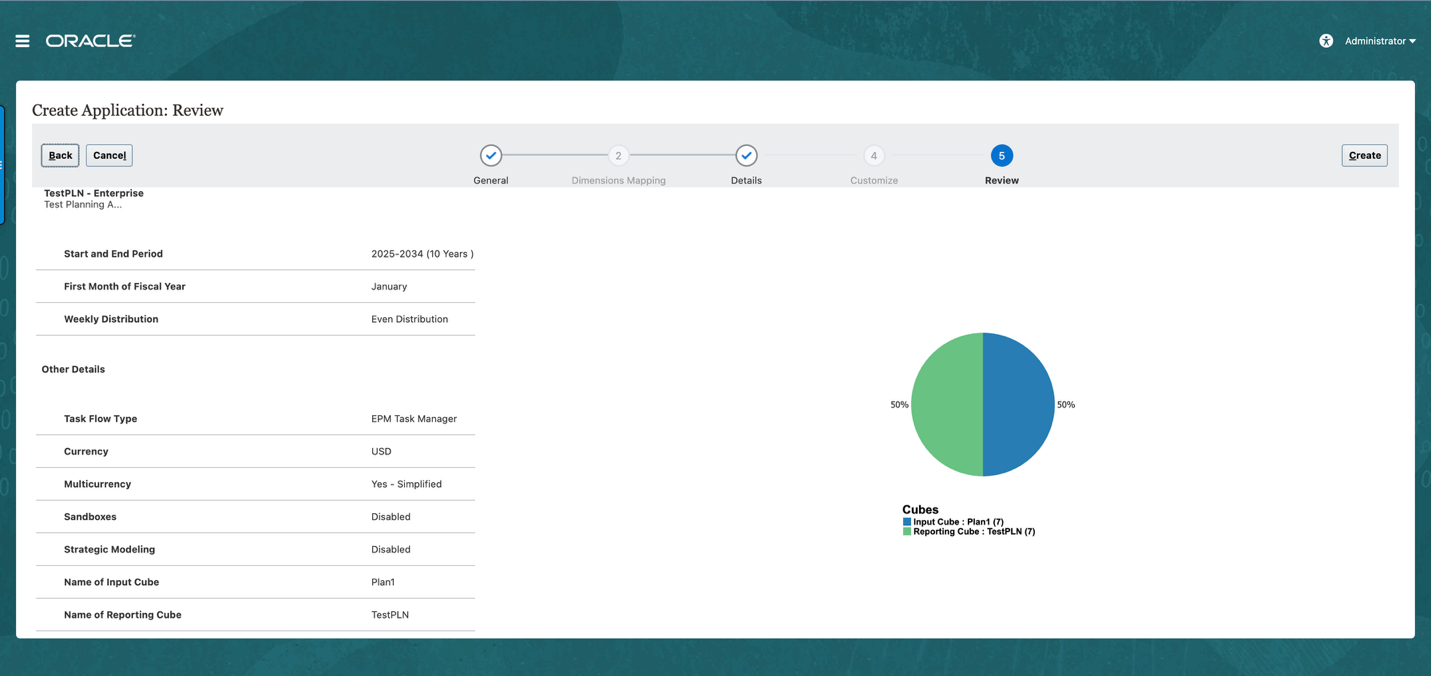
The last step before deploying the application is to review your selections. Once you’re satisfied that everything looks right, be bold and hit that Create button. Your application will be ready in short order, and you can begin configuration by enabling everybody’s favorite module — Workforce.
What’s next
That’s it for part one. I’ll continue the series by walking through the enablement process and covering some of the big decisions you need to make before clicking that Enable button.
Until next time, plan well and stay curious.
ZERO VARIANCE. PASS IT ON.